Latest blog entries

IrfanView and “Show text” setting for slideshows

Wednesday, July 29th, 2026 at 09:17pm

(this is mostly a post for my own reference)

At the camera club we use IrfanView to display our monthly competitions entries. The images to be presented end up in a number of folders which are copied to the club’s laptop, then batch scripts run IrfanView with the /slideshow option.

Recently I reset that laptop back to a fresh install of Windows 11 (the only way to uninstall all Adobe software) so I also needed to reinstall programs such as IrfanView, which I did.

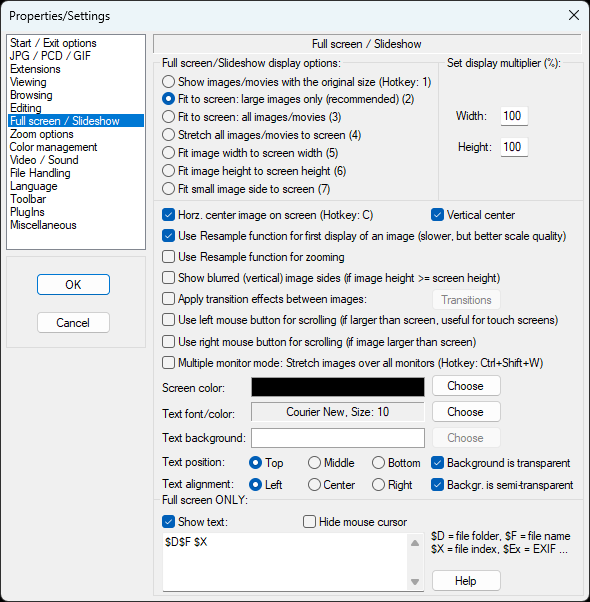
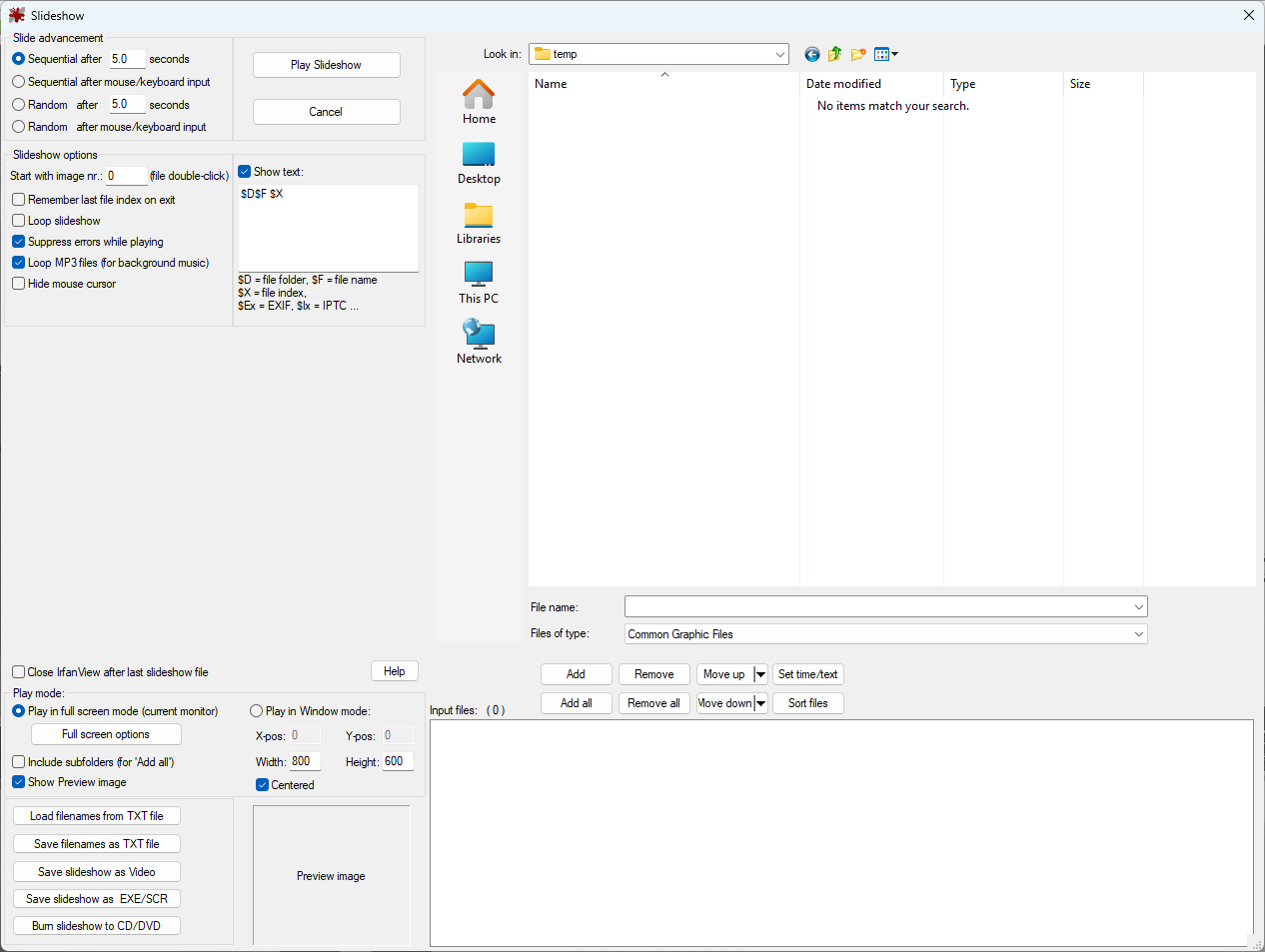
But then I tested running a slideshow, oh I need to turn off the text which shows the image path. No problem, there is a page in the settings for slideshow:

I turned off “Show text” and turned on “Hide mouse cursor”

Tested the slideshow again… that didn’t work.

I loaded a single image and went full screen, that doesn’t show the text. What is happening?

I then spent an hour or two trying all sorts of options like reverting to an older version and targeting an ini file in the local directory, none of them worked. Though I could change the position of the text, so some settings were working.

I had been so fixated on the text showing that for a while I didn’t notice the other issue, that the images were advancing automatically, not waiting for mouse/keyboard input.

Where is that setting? Oh, those are when you go to start a slideshow:

There it is at the top left, “Sequential after mouse/keyboard input”

Hold on… why is there also a “Show text” setting here?

Ah, if I change the setting and then Cancel, it still changes settings for slideshows, so now when I run from the batch file it is doing what I want.

Not the best design, mixing settings for running a new slideshow with settings for future slideshow.

Is is also only now that I have taken these screenshots that I see that “Full screen / Slideshow” settings page is split, most of the settings apply to both full screen and slideshow, but the bottom settings (where “Show text” is) is below a “Full screen ONLY” divider…

Tagged with: , ,

Local build or docker container?

Tuesday, July 14th, 2026 at 08:05pm

When I originally setup Zigbee2MQTT on a Pi I followed the recommended path for Linux, which was to install Node.JS, clone the Zigbee2MQTT repo and then start it up. That first startup would install dependencies and build the app.

Over time I was able to at least once use the provided upgrade script to upgrade to the latest version in-place, but it then got to a point where the upgrade would crash the Pi and fail. Due to the Pi I am using only has 512MB (some reserved for video which I don’t use) one recommendation was to set memory limits for the build, but that just caused the build to fail with an out of memory error.

So I didn’t upgrade.

I knew I needed to get the upgrades working so when I started considering upgrading the Pi I use for Kodi an additional benefit was that I could replace the Pi 3 A+ with a Pi 3 B+ that has double the memory. But then what would I use the current A+ for? It felt a bit of a waste to upgrade the hardware for just the build process, because otherwise the A+ is running Zigbee2MQTT fine.

I preparation for a potential new install of Zigbee2MQTT I went back and reviewed the install instructions, which is when I found that their recommendation is now to just use Docker. I am fine with using multiple docker containers on my linux box to run various services, but it still felt a bit wrong to have a computer for a single task running a full operating system which then runs docker for a single container…

But it works and I have now upgraded Zigbee2MQTT to the latest version without upgrading hardware.

Tagged with: ,

Digging deep into the backlog

Thursday, July 2nd, 2026 at 07:20pm

Later this month I am heading up to Sydney and have built in three full days to wander around with my camera. As well as researching new places to go I was also looking back at my past photos, only to find that on a previous trip in 2008 (the early days of me having a DSLR) I had only done something with two images, and then left the rest.

While there were no spectacular shots, there was enough there to end up with a decent selection so I put them up as an album: Sydney 2008

Rising behind

I then looked further into my older photos and found a few more trips or events where I had more unprocessed photos, so I worked my way through them and put up four more albums:

Connecting rods Floating over the sunrise

Old navigation aid From the hide

My photos after these have been suitably processed, so now I need to get back to what I have taken over the last year.

Tagged with: ,

A media player upgrade

Wednesday, June 24th, 2026 at 08:16pm

It has now been five years since I switched over to Kodi on a Raspberry Pi as the media player for my television. It has been working well, except that it was struggling with the newer codecs and higher resolutions, but it wasn’t enough of a bother to consider replacing it.

A few months ago via a former colleage I ended up with a Pi 5 that otherwise was destined for e-waste, so I stuck my head back into the pi/media player space to find that Kodi has continued on with a few new versions, as has the LibreELEC distribution to make running it easy.

However the RemotePi would not be able to be transferred over (the one I had for the Pi 3 couldn’t handle the power needs of a Pi 4) and that company has shut down and vanished off the internet so I needed to find a replacement for IR and power management. I had never really looked at case options, so I was pleasantly surprised to find there was wide variety of cases, including some that provided an IR receiver, power management and also upsizing and relocating the HDMI ports.

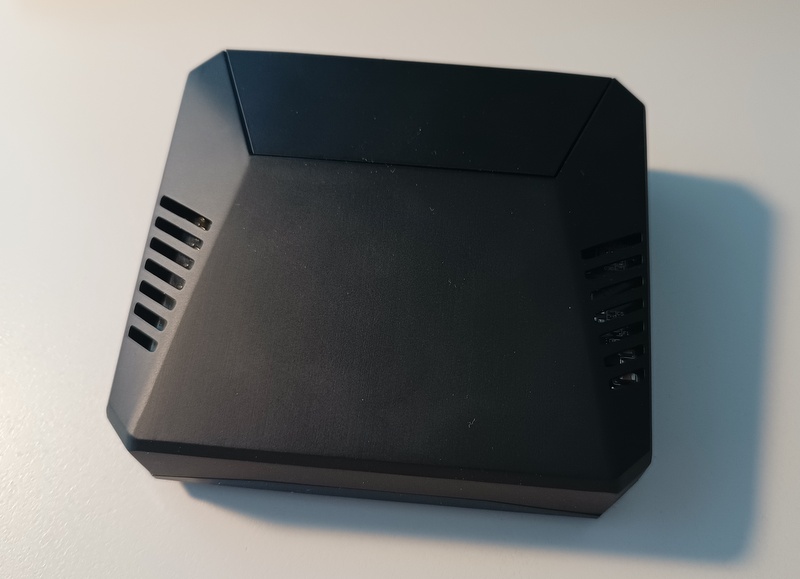
I quickly settled on the Argon ONE V3 Case (not the version with NVME support) and the matching remote (even though the plan is to keep using my Harmony 650), these were delivered today.

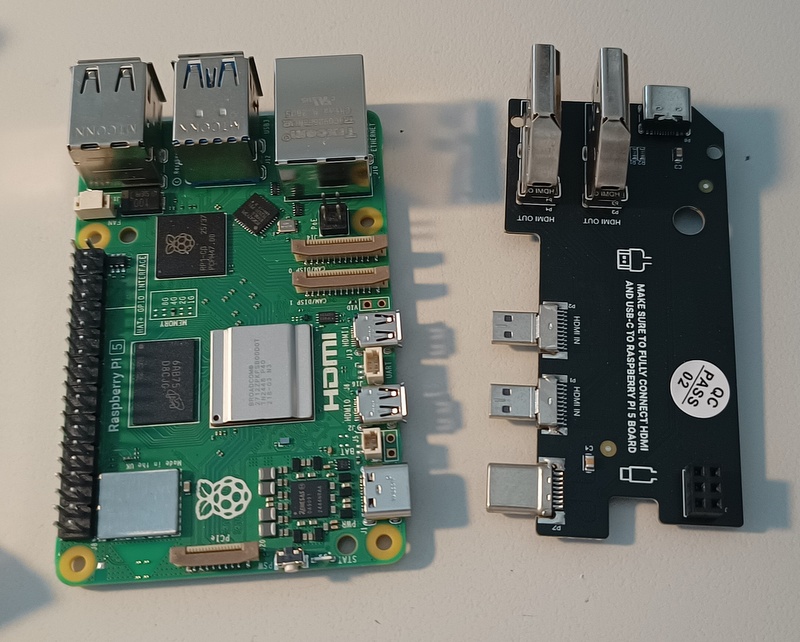
Argon ONE V3 Case for Raspberry Pi 5 Raspberry Pi 5 and the HDMI/Power board from an rgon ONE V3 Case

It was a little bit fiddly but otherwise straightforward to get it all assembled. I loaded the latest LibreELEC onto a spare SD card (not the fastest boot option, but is all I need) and after installing a couple of add-ons I was able to control it via the Argon remote.

When looking into my options earlier I had found that someone had forked the Argon add-on to make updates and also make it available from the Kodi repository, so I didn’t even need to manually install that plugin, just find it in the list.

I could have stopped there but I now needed to get it working again with my Harmony remote. I don’t fully understand all the config but the I think the key items are:

  • in the config.txt file the dtoverlay=gpio-ir,gpio_pin=23 line (added by the argon plugin) will enable the IR kernel module on pin 23
  • this in conjunction with the mappings I found in a config file were what enabled the IR receiver and setup the buttons on the Argon remote
  • the config.txt entry from my previous Pi was dtoverlay=gpio-ir,rc-map-name=rc-rc6-mce which loads the IR module (using default pin) and then maps an RC6 Media Center remote

Having Argon buttons in a config file and then MCE buttons from a keymapping felt like they would co-exist, so I tried:

dtoverlay=gpio-ir,gpio_pin=23,rc-map-name=rc-rc6-mce

I don’t know if this is the “proper” way to do things, but it worked! I could now control Kodi from either the Argon remote or my Harmony remote with its MCE programming.

I reprogrammed my Harmony remote (I’m so glad that software still works) with the Argon power button code, so that is also fully functional.

Tagged with: ,

Should I get a home battery?

Saturday, February 7th, 2026 at 01:55pm

Is has been over a year since I posted about my home energy usage, when I switched my electricity plan to a time of use plan.

So how has that gone? Courtesy of home assistant I have this pretty chart for 2025:
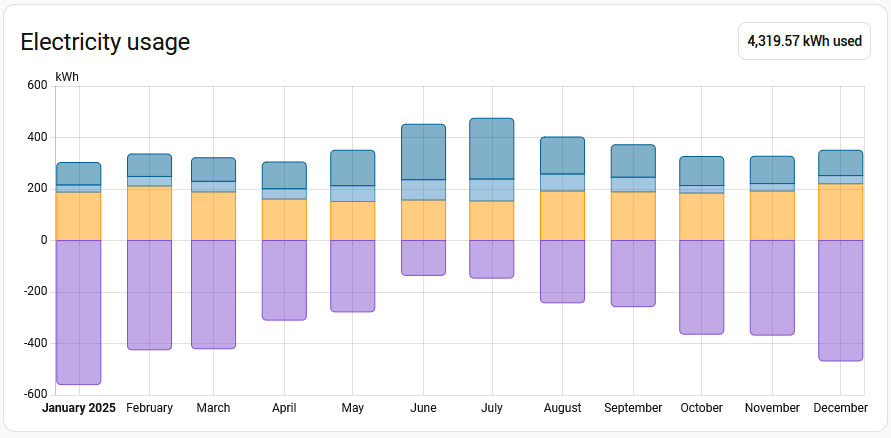
Combined with the other reporting, what does this tell me?

  • The total energy i used to get stuff done was 4.32MWh
  • My solar panels have generated 6.16MWh, I was only able to directly use one third, with 3.97MWh sent to the grid
  • I pulled 2.13MWh from the grid, 1.57MWh in off-peak and 0.58MWh in peak times
  • In a summer month I have heaps of excess solar, and overall use less energy (more daylight hours, only use the AC on the hotter days)
  • For a winter month I directly consume about half the solar, with overall more energy used (mostly because at least one AC unit will be heating a room when I am awake)

What does this translate to on my bills?

RateUsageCost
Daily charge$1.15/day365 days$419.75
Peak rate37.2c/kWh584.41 kWh$217.40
Off-peak rate22.3c/kWh1546.38 kWh$344.84
Solar rate3.1c/kWh-3971.23 kWh$-123.10
Total:$858.89

If I look back to 2023 I paid $1,853 for gas and $1,635 for electricity, a total of $3,488. That $858 figure is looking quite nice, it could be said that the changes I made at the end of 2023 (adding solar, removing gas) are saving me $2,500 each year.

I was curious about the impact of solar, so I ran the numbers to estimate what my bills would have been if I had only dropped gas (the addition of AC units) and replaced the hot water system. I likely still would have switched to a time of use tariff and then minimised my usage during peak times, for the calculation I will pro-rata the overall usage:

RateUsageCost
Daily charge$1.15/day365 days$419.75
Peak rate37.2c/kWh1184.57 kWh$440.66
Off-peak rate22.3c/kWh3134.43 kWh$698.98
Total:$1559.39

So based on these numbers, getting rid of gas just removed that bill from the equation. While the savings from switching to a heat pump for hot water were taken up by using the AC units (aka other heat pumps) for heating, with the bonus of now having cooling as an option.

So now back to the question of sending excess solar to the grid. In the two years since the installation the feed in tariff has dropped from 6c/kWh to 3c/kWh, if I were to change plans now it is down to a measly 1c/kWh.

So sending excess solar to the grid should be the last resort. I currently try to have all my large usage loads during the day when there is solar which is hot water, the dishwasher, the washing machine, half of my heating/cooling and more than half of my cooking. The remainder of the heating/cooling and cookie is in the evening, when there is no solar.

I don’t have an EV (yet…) but my car usage is mostly local a couple of times a week, so topping off its battery wouldn’t be significant.

So would it make sense to get a home battery?

Using this as my usage pattern:

Average dayConsumptionFrom gridFrom solarExcess solar
Summer12.1 kWh4.4 kWh7.7 kWh15.1 kWh
Winter15.3 kWh10.2 kWh5.1 kWh4.7 kWh

So what type and size of battery would fit with this usage?

I have yet to dig into the details of batteries but I have seen a number of examples using typical sizes of 6kWh and 10kWh. So in summer I could easily charge up a 6kWh or 10kWh battery from solar every day, only needing the capacity of 6kWh for my overnight usage. However in winter I would need a 10kWh battery to handle my overnight usage, which I would not be able to charge up each day.

Assuming I had a suitable battery, what would I save in grid costs?

In summer all my consumption might be able to be covered directly by solar or by the battery charged up by solar. Any pittance I get from excess solar would go towards offsetting the daily charge, in an ideal month the overall bill might be zero.

For a summer month with the ideal case of drawing nothing from the grid:

RateNo batteryWith battery
UsageCostUsageCost
Daily charge$1.15/day30 days$34.5030 days$34.50
Peak rate37.2c/kWh39.6 kWh$14.730.0 kWh$0.00
Off-peak rate22.3c/kWh93.2 kWh$20.780.0 kWh$0.00
Solar rate3.1c/kWh-454.3 kWh$-14.08-321.5 kWh$-9.97
Total:$55.93$24.53

That is looking promising, with the monthly bill in summer being halved, but with batteries looking to cost at least $8000, that is a 25 year ROI… and what about a winter month where all the excess solar goes into the battery to offset part of the grid usage?

RateNo batteryWith battery
UsageCostUsageCost
Daily charge$1.15/day30 days$34.5030 days$34.50
Peak rate37.2c/kWh85.3 kWh$31.7346.6 kWh$17.34
Off-peak rate22.3c/kWh236.3 kWh$52.69128.8 kWh$28.72
Solar rate3.1c/kWh-146.2 kWh$-4.53-0 kWh$0.00
Total:$114.39$80.56

Hmmm… I didn’t quite expect for the bill reduction to be around the same, and it might be an artifact of these specific numbers, but with the additional saving being so small it is not looking like a home battery would be a good option for me.

Apart from general chatter in news and other places about batteries, the one thing that triggered my thinking about it was an email from the company that installed my solar panels, I will see what they will suggest (with the awareness that they are trying to sell their services).
Tagged with: , ,